Rejects go to a quarantine, not a shredder, so nothing you cull is ever deleted. See how culling works
100% on-device · your photos, never uploaded

Find your keepers in one pass. Your device, only.

Winnow clusters your bursts, scores every frame for sharpness, and pre-picks the keepers across the thousands of shots in a single wedding or event, all on your Mac and iPhone. No upload, no subscription, no account, unlike the cloud tools that rent you their workflow by the month. The duplicate finder stays free forever for everyone else.

Get access Try the live demo below
Photos never leave your device Pay once, own it. No subscription Duplicate finder free forever

Winnow your library: separate the keepers from the rest, entirely on your own device.

The real prototype, running above on sample photos. Press K to keep, X to set aside, ↵ for the next cluster. Nothing is uploaded; there is nothing to upload.

The backlog

You know the feeling

A single wedding or event runs to thousands of frames, most of them bursts and near-identical takes, and hand-picking the keepers is hours of work with your judgment fading after the first 90 minutes. The same backlog builds from a weekend of your kid's games or a week of travel. Deleting feels dangerous, so nothing gets deleted, and it quietly turns into years. The worst part: your built-in duplicate finder only catches byte-identical or trivially similar files, so the real clutter, the bursts and the almost-identical frames, never even shows up.

3 to 5 hrs

What hand-picking the keepers from a single 3,000-photo library actually takes, with judgment fading after the first 90 minutes.

Source: Imagen AI research on photo-review time

In the app today

Real screenshots from the shipping builds

Winnow Photos is live: the iPhone build on TestFlight and the Mac app alongside it. These are actual captures from the current builds, reviewing a sample library.

Winnow for Mac reviewing a folder: burst of 7 clustered, best frame starred, sharpness scores and why-this-frame reasoning
The Mac app: bursts clustered, best frame starred, and "why this frame" on every pick.
✓ Real screenshot, current build
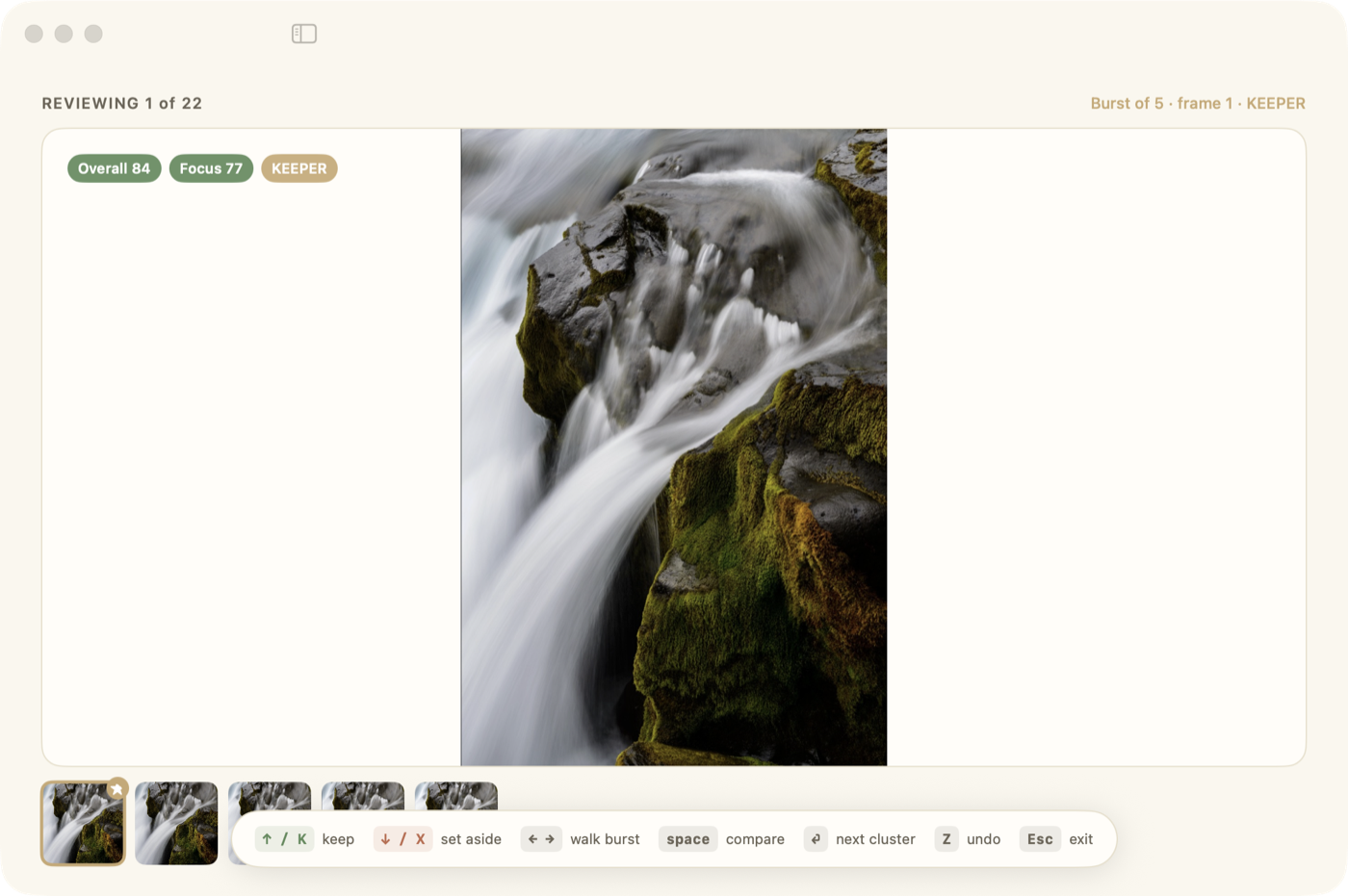
Winnow for Mac speed mode: full-window keyboard-only review with the shortcut legend
Speed mode: keyboard-only review. Keep, set aside, walk the burst, never touch the mouse.
✓ Real screenshot, current build
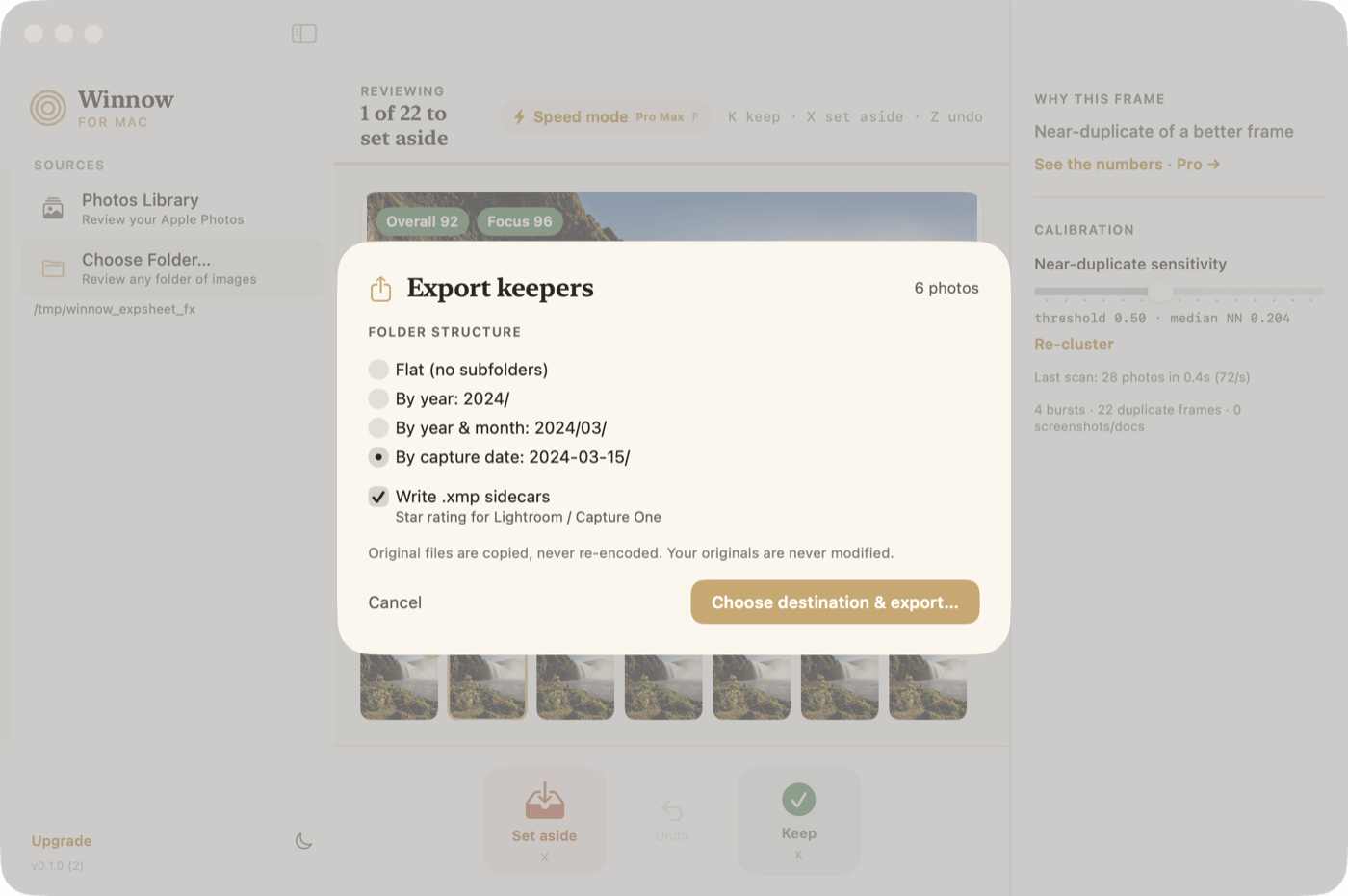
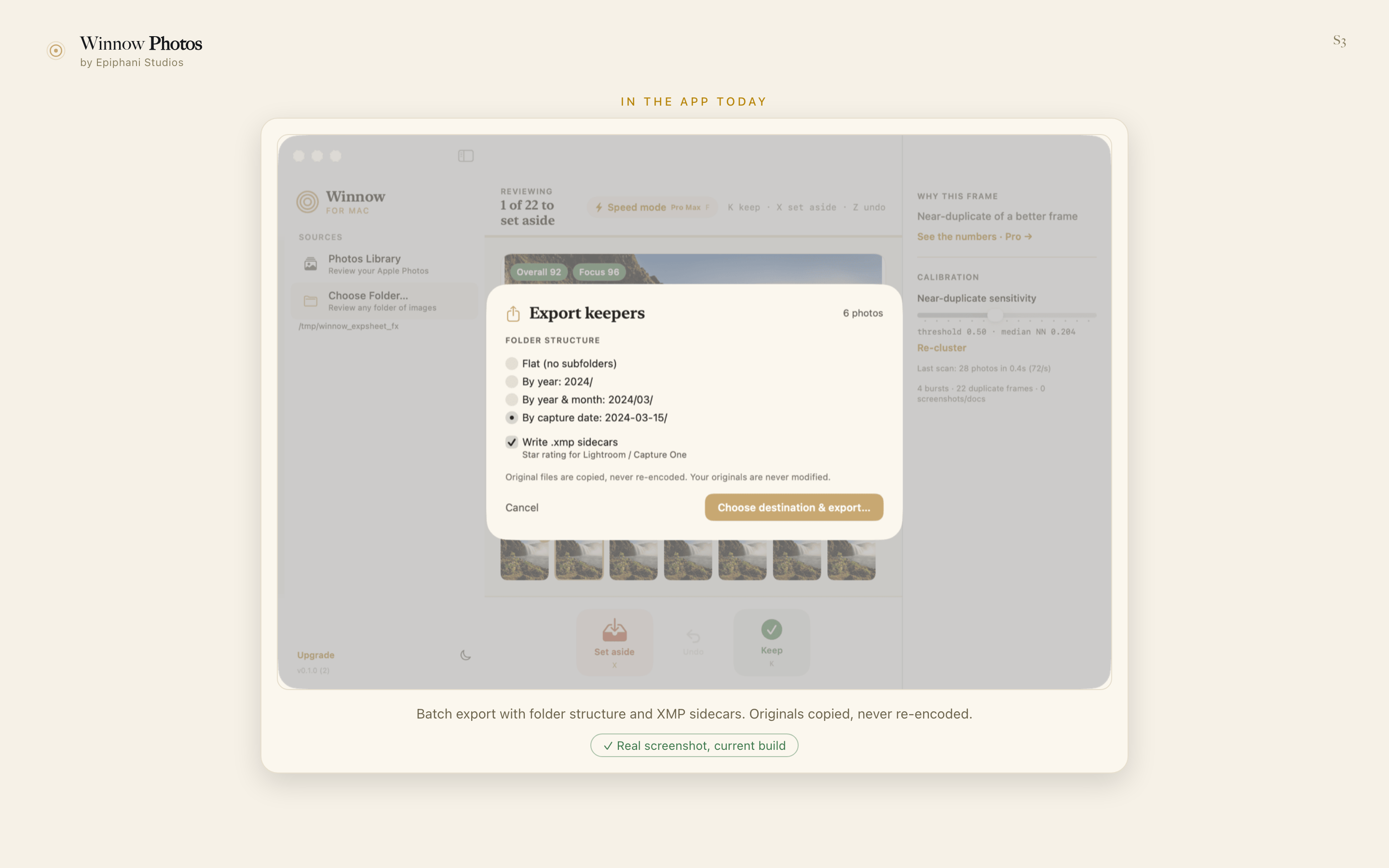
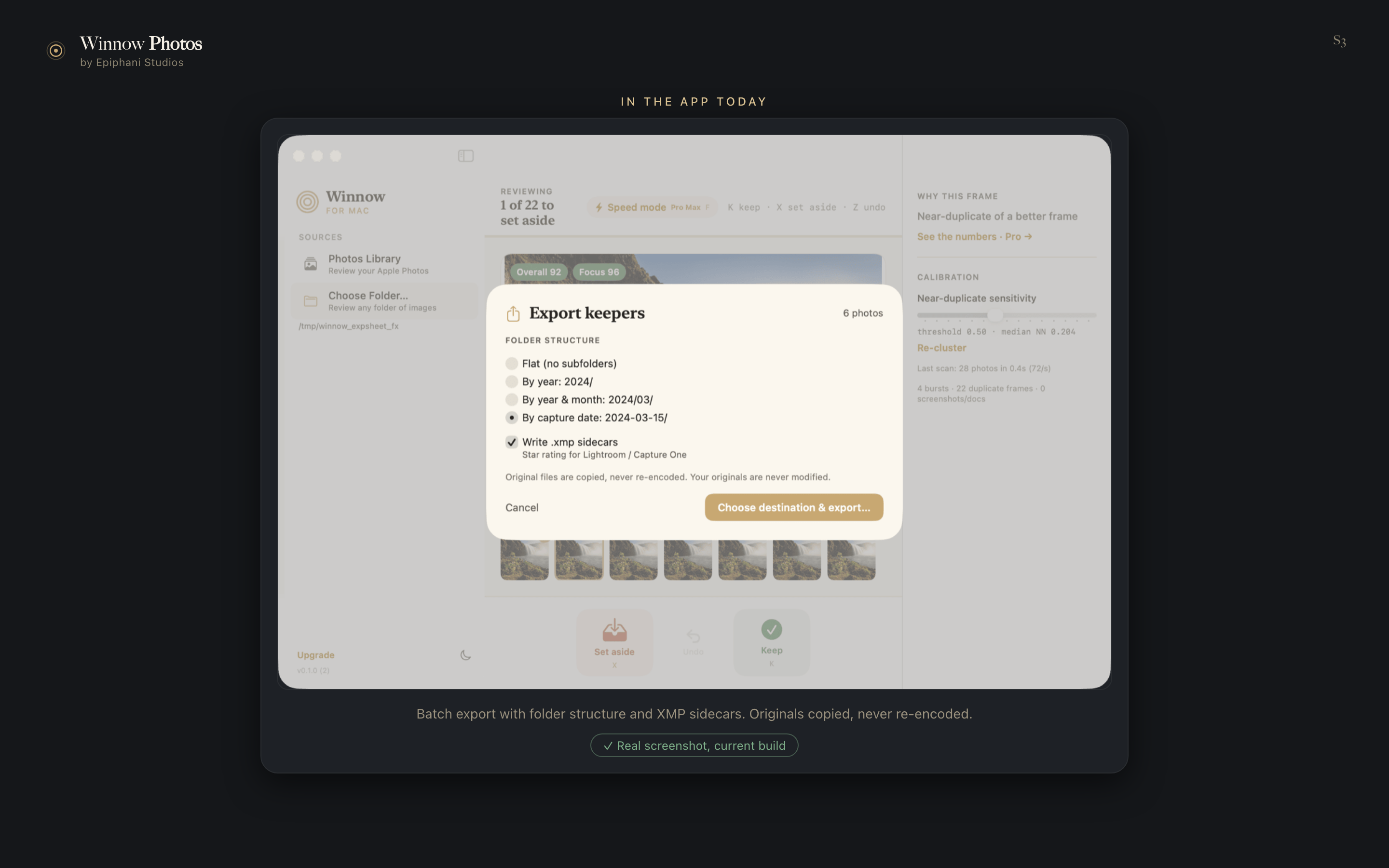
Winnow for Mac export sheet: folder structures by date, XMP sidecars for Lightroom and Capture One, originals never re-encoded
Batch export with folder structure and Extensible Metadata Platform (XMP) sidecars. Originals copied, never re-encoded.
✓ Real screenshot, current build
Winnow for Mac showing 28 keep decisions synced from another device through iCloud
"28 synced from another device." Decisions travel through your own iCloud; photos never do.
✓ Real screenshot, current build
Winnow for Mac merging two sources into one review queue: a card_a source badge on the candidate frame, both sources listed Ready, real scan stats for 34 photos across 6 bursts
Two sources merged into one review queue: source-tagged clusters, best frame starred, rejects sorted back to where they came from.
✓ Real screenshot, current build
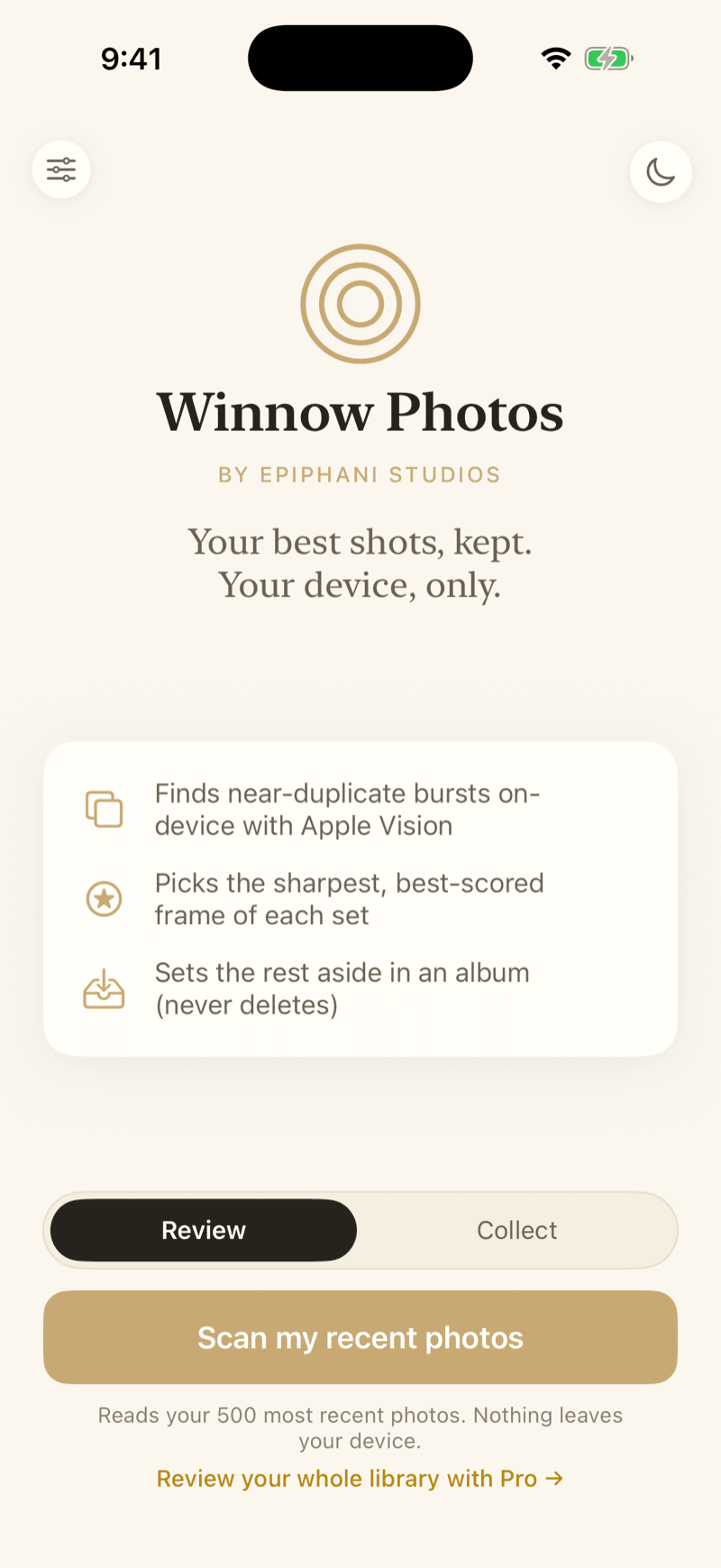
Winnow Photos welcome screen on iPhone
On iPhone: point it at your library. No import, no account, no upload.
✓ Real screenshot, current build

The moment this is built for

A shoot, cleared in one sitting

Cards off the camera, the last cluster of the night. Burst of seven collapsed to one starred frame, "1 of 22 to set aside," Speed mode running the whole review by keyboard, no mouse required.

The workspace

Review your whole scattered library in a single queue, for one price

Eight capabilities. Built where they are live, mocked up where they are not, and never mixed up on this page. The category sells a verdict; this is the workspace behind it.

Cluster the mess, star the keeper

Drop your library in. Near-duplicates and 40-shot bursts collapse into one cluster, with the sharpest, best-composed frame already starred, even past 10,000 photos.

Live now

Free clusters and pre-picks today. Full-library depth is Pro.

Winnow for Mac reviewing a folder: burst of 7 clustered, best frame starred, sharpness scores and why-this-frame reasoning Winnow for Mac reviewing a folder, dark theme

Your decisions follow you to every device

Start sorting on your Mac, finish on your iPhone. Only your keep and set-aside decisions sync, through your own iCloud, never a photo.

Live now

Pro: Mac and iPhone/iPad sync today.

Winnow for Mac showing 28 keep decisions synced from another device through iCloud Winnow for Mac sync banner, dark theme

Shows its work

Every pick carries its reason, sharper focus and stronger composition, plus a tunable severity slider, so intentional motion blur or bokeh doesn't get auto-flagged as a defect.

Live now

Pro: the reasoning and the sensitivity slider both ship in the current build, visible in the review screen above.

A quarantine, not a shredder

Every set-aside photo lands in a recoverable album with full undo. Nothing is ever silently deleted, the fear that keeps most libraries from ever getting sorted.

Live now

Free tier, from the very first run.

Runs on your device, always

All scoring runs on Apple's on-device vision frameworks. No upload, no account, and it works in airplane mode.

Live now

Every tier, zero cloud dependency, verified against the current build.

Plugs into your real editor

RAW decode for the formats that matter, ARW, CR2/CR3, NEF, RAF, DNG, batch export with folder structure, and XMP sidecars, so Lightroom or Capture One pick up Winnow's picks automatically.

Live now

Pro Max, shown below in the current build.

Winnow for Mac export sheet: folder structures by date, XMP sidecars for Lightroom and Capture One, originals never re-encoded Winnow for Mac export sheet, dark theme

Every source, reviewed as one library

Point Winnow at more than one memory card, old drive, or stalled catalog at once, and sort the whole scattered mess in a single pass.

Live now

Studio tier, shown below in the current build.

Winnow for Mac merging two sources into one review queue: a card_a source badge on the candidate frame, both sources listed Ready, real scan stats for 34 photos across 6 bursts Winnow for Mac merging two sources into one review queue, dark theme

Speed-run a shoot

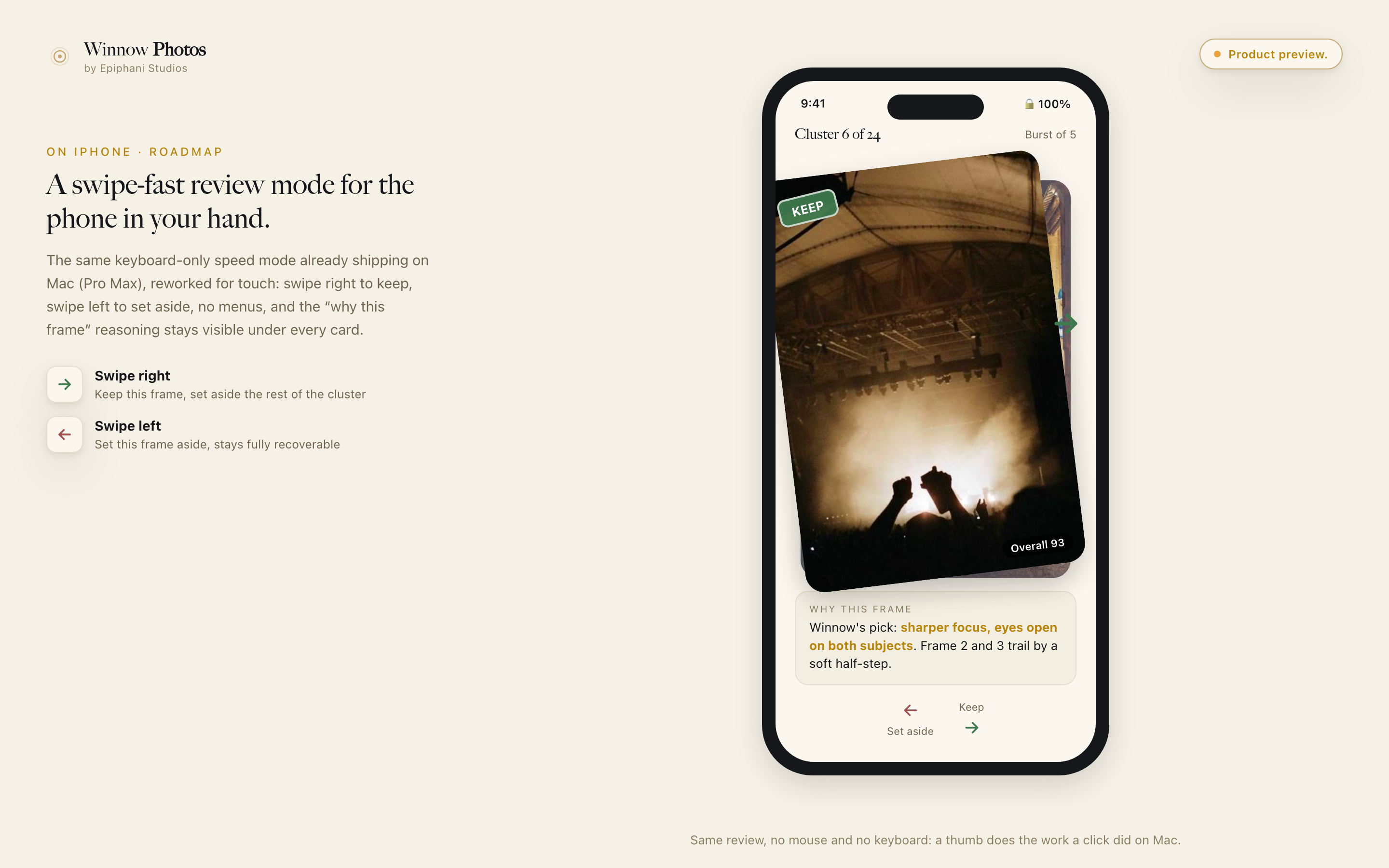
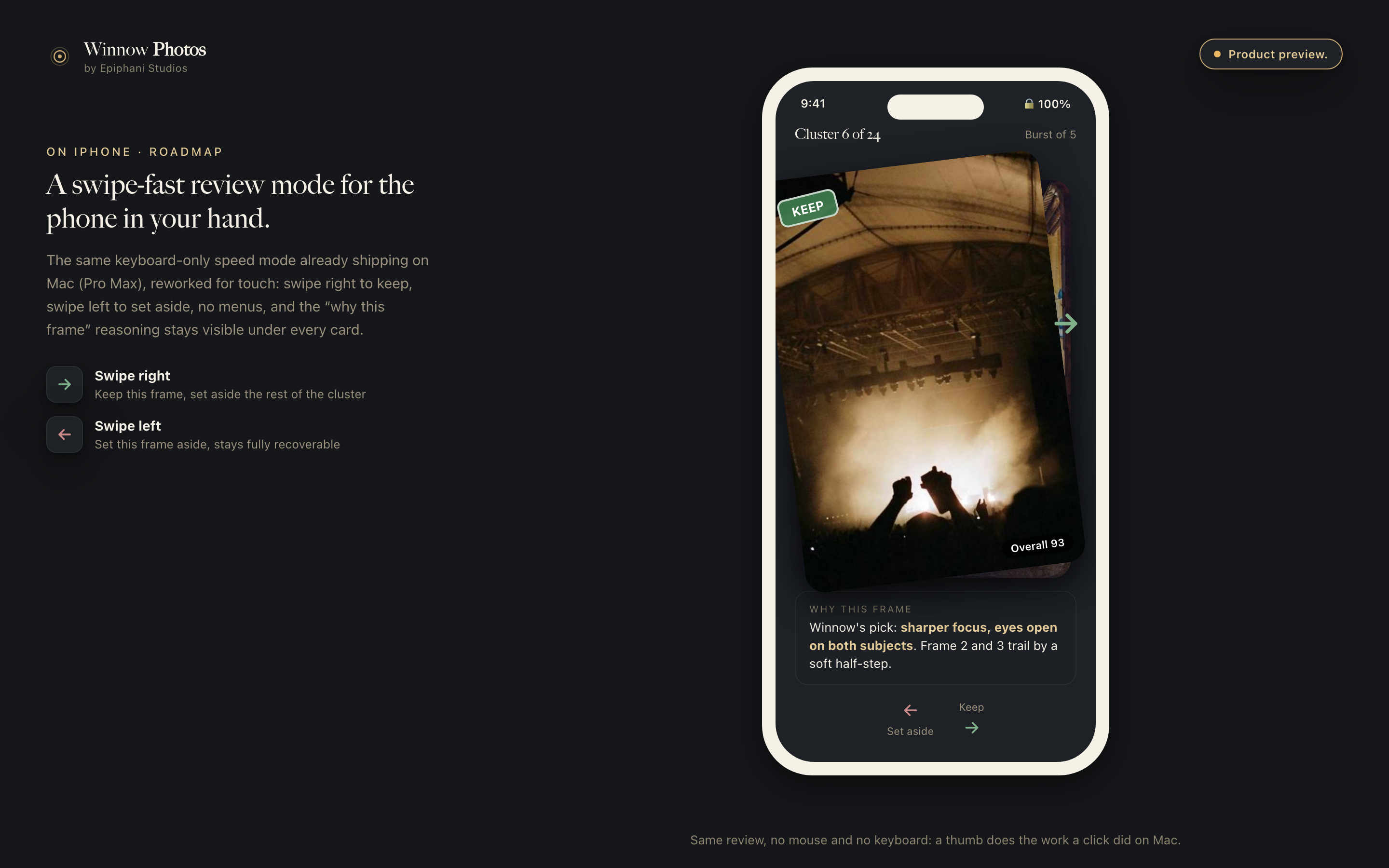
An arrow-keys-only review mode: keep, set aside, next cluster, no mouse, no menus. Live on Mac today; a swipe-fast version for iPhone is next.

Live on Mac

Pro Max, Mac only, shown below in the current build.

Winnow for Mac speed mode: full-window keyboard-only review with the shortcut legend Winnow for Mac speed mode, dark theme
Mockup

iPhone swipe review, shipping to Studio members. The image below is a mockup.

Mockup of touch and swipe speed mode on iPhone: swipe right to keep, swipe left to set aside Mockup of touch and swipe speed mode on iPhone, dark theme

The honest split

What is live today vs. what Studio members unlock next

Clustering and pre-pick, why-this-frame reasoning, the quarantine safety net, on-device processing, cross-device sync, RAW export to your editor, multi-source batch ingest, and keyboard speed mode on Mac all run in the current build, shown above with no preview tag. Touch-swipe review on iPhone is the one unbuilt piece: Studio members lock in today's price now and get the feature the moment it ships. Nothing on this page outruns the build it describes.

Lock today's price

How it works

Three steps, no upload

Point it at your library.

Open Winnow and select your Photos library on iPhone or iPad. No import, no conversion, no account.

It scores and clusters.

On-device artificial intelligence (AI) groups visually similar shots, scores each frame for sharpness and aesthetics, and pre-picks the best of every cluster.

You confirm the keepers.

Review clusters side by side, confirm Winnow's pick or swap it, and the rest moves to a recoverable set-aside album. Undo anything.

Why Winnow

Everything marked shipped is in the current build, verified before it appears on this page. No claim on this page outruns the build.

Shipped

Finds what exact-match finders miss.

Perceptual, on-device matching clusters near-duplicates and bursts even when filenames differ or edits were made, the clutter that byte-identical checkers skip entirely.

Shipped

Pre-picks the winner, shows its work.

Every cluster is scored for sharpness and aesthetics and the best frame comes pre-selected, so a 40-shot burst is one confirm, not 40 decisions.

Shipped

A safety net, not a shredder.

Everything you set aside moves to a recoverable album with full undo. Nothing is silently deleted, which is exactly the fear that keeps libraries bloated.

Shipped

Your photos stay on your device.

All photo processing runs on your device with Apple's on-device vision frameworks: no cloud, no server, no third party. It works in airplane mode. (If enabled, only your keep/set-aside decisions sync through your own iCloud, never a photo.)

Pay once, keep it forever.

Pay once and own it. No monthly fee, no renewal, no account required. In a category full of subscriptions, Winnow charges you once and gets out of the way.

Shipped

Start on your Mac, finish on your iPhone.

The Mac app has landed: keyboard-first speed mode, RAW support, batch export with XMP sidecars, and your keep decisions syncing privately through your own iCloud, never a third-party cloud.

The honest comparison

Where Winnow wins, and what we deliberately leave out

Feature-by-feature against the three tools buyers compare us to most. Shipped means shipping in the current build; every Winnow claim below reflects the build as it stands.

CapabilityWinnowGemini PhotosAftershootLightroom (cloud)
Near-duplicate + burst clustering, beyond exact copies✓ Shipped✗ manual
Auto best-shot pick per cluster, scored✓ ShippedPartial
100% on-device, photos never uploaded✓ Shipped✗ cloud-first
Recoverable set-aside + undo, never silent delete✓ ShippedTrash-basedNot statedManual
Genuinely free tier, not a timed trial✓ Duplicate finder, free forever✗ three-day trial✗ 30-day trial
One-time purchase available✓ $29 / $49 / $99 once✓ $19.95 lifetime✗ subscription✗ subscription
Cross-device sync of keep / set-aside decisions✓ Shipped · ProVia cloud upload
RAW format support✓ Shipped · Pro Max
Photo editing and retouching✗ out of scope
Face recognition / keyword tagging✗ out of scope

What Winnow deliberately does not do: Winnow picks your keepers; it does not edit or retouch (Aftershoot does), and it does not do face recognition or keyword tagging (Lightroom does). It finds keepers and hands them to whatever you already use for editing. Winnow ships on iPhone, iPad, and Mac today; Windows and Android are on the long-term roadmap. Comparison reflects our July 2026 research of the photo-review category; product details change, check each vendor for current specifics.

The industry, in its own words

This pain is real and documented

These are sourced voices from photography communities describing the problem, not Winnow customers. Real customer reviews will replace these as they come in.

"I still have about 30,000 photos in my backlog, so I should be done in about 100-300 days."

"After my son's baseball games, I'd come home with thousands of photos to sort through. Most of them were just rapid-fire bursts, near-duplicates, or completely irrelevant, useless shots."

"Trying to go through hundreds of thousands of images in Lightroom and deleting them is no easy feat."

The score

What the score actually is

Most tools in this category say an AI picks your best shots and stop there. Here is the whole of it, so you can decide whether it will see your photos the way you do.

Three signals, all from Apple's on-device Vision framework.

First, a feature print of every frame. Near-identical shots sit close together in that space and a different scene sits far away, which is how a long burst collapses into one cluster without anyone tagging a thing. Second, Apple's trained aesthetics score, which also flags a utility shot: the receipt, the whiteboard, the screenshot that was never meant to be a photograph. Third, a sharpness measure taken from the variance of the image's second derivative, the classic way to tell a crisp frame from a soft one.

Sharpness is the tie-breaker, not the judge.

The aesthetics score decides, and sharpness separates the frames it rates level. Utility shots move down the list rather than getting starred. The sensitivity slider changes where the cutoff sits, so deliberate motion blur or a shallow depth of field does not read as a mistake.

Nothing here needs a server.

All three signals run on the chip in the device you are holding. That is why it works in airplane mode, and why there is nothing to upload.

The limits

What Winnow does not do

It needs iOS 18 or macOS 26.

Apple's aesthetics scoring arrived in iOS 18, and that is the app's minimum: there is no older-OS fallback to install into.

RAW files are Pro Max.

Winnow decodes ARW, CR2, CR3, NEF, RAF, and DNG through Core Image and scores them exactly like a Joint Photographic Experts Group (JPEG) file, but that requires Pro Max or Studio.

Apple platforms only.

There is no Android version and no Windows version.

Your decisions travel, your photos do not.

Sync carries keeps and set-asides through your own iCloud. A device that cannot already see the library has nothing to show you. That is the cost of never uploading a photo, and it is deliberate.

It does not edit.

There is no develop, retouch, or export preset beyond copying originals with their sidecars. Winnow finds the keepers and hands them to whatever you already use for editing.

Pricing

Pay once. No subscription. Ever.

Every feature listed ships in the current build. Your price locks now and never changes.

Free
$0
Find your duplicates.
  • On-device duplicate and burst clustering
  • Best-shot pre-pick with scoring
  • Recoverable set-aside, full undo
  • No account, no time limit, no card
Get started
Pro
$29 once
Review your whole library for a single payment.
  • Everything in Free
  • Full-library review with blur and burst scoring
  • Mac app + private sync through your own iCloud
  • Tunable blur sensitivity (motion blur is not a defect)
  • "Why was this flagged" reasoning on every pick
Get Pro for $29
Pro Max
$49 once
Built for serious shooters.
  • Everything in Pro
  • RAW support (ARW, CR2/CR3, NEF, RAF, DNG)
  • Batch export with folder structure
  • XMP sidecars for Lightroom / Capture One
  • Keyboard-first speed mode on Mac
Get Pro Max for $49
Studio
$99 once
For the working photographer.
  • Everything in Pro Max
  • Multi-shoot batch processing across every card, drive, or folder in one queue
  • Priority support
  • One year of Aftershoot Pro is $480 to $576. This is $99, once.
Get Studio for $99

"A single wedding-sized shoot runs three to five hours of your own time to sort by hand, or $10 to $48 a month forever on a subscription built for someone else's workflow. One year of Aftershoot Pro runs $480 to $576. Winnow Studio is $99, once, and Pro is $29."

Get access

Leave your email and we will send your TestFlight invitation for the current iPhone build, plus the Mac app. Your price locks the day you join. No spam, no sharing, unsubscribe any time.

You are on the list. Watch your inbox for the TestFlight invite.

Questions

Good to know

Will my photos ever leave my device?

No. All processing runs on your iPhone, iPad, or Mac using Apple's on-device vision frameworks. Nothing is uploaded, there is no Winnow server involved at any step, and the app works with no internet connection at all. If you use cross-device sync, only your tiny keep/set-aside decision log travels, through your own iCloud; your photos never do.

Is this a subscription?

No. Winnow is a one-time purchase. The duplicate finder is free forever, and Pro ($29), Pro Max ($49), and Studio ($99) are single payments with no renewal and no expiration. Your price locks the day you join.

How is this different from Apple Photos' duplicate finder?

Apple Photos catches byte-identical or trivially similar files. Winnow uses perceptual matching to cluster near-duplicates and burst sequences even when files differ, then scores every frame and pre-picks the best shot, which is where the real clutter lives.

What can Winnow do today?

Today: on-device duplicate and burst clustering, sharpness and aesthetics scoring with a pre-picked best shot, the recoverable set-aside safety net, album filing, and the Mac app, with private iCloud sync of your decisions, RAW support, batch export, XMP sidecars, and the keyboard-first speed mode. Everything on this page is what the Mac app does now.

Does Winnow work with my camera's RAW files?

Yes, with Pro Max. Winnow decodes and scores the major formats (Sony ARW, Canon CR2/CR3, Nikon NEF, Fuji RAF, Adobe DNG) using Apple's RAW engine, treats RAW+JPEG pairs as one photo, and exports your original RAW bytes untouched with an XMP sidecar.

Can I sync my keep decisions between my Mac and iPhone?

Yes. Your keep and set-aside decisions, never your photos, sync privately between your own devices through your own iCloud, never a third-party cloud. Start on your Mac, finish on your iPhone, and every decision carries over.

What happens if I disagree with a pick?

Swap it. The starred frame is a proposal, and confirming or overriding it is one key either way. The sensitivity slider moves the threshold for the whole library at once, which is the right control when a whole shoot is intentionally soft: a long lens wide open, a night scene, deliberate motion. Nothing is decided until you confirm the cluster.

What happens to the photos I set aside?

They go to a recoverable album, not to the bin. Every set-aside is undoable, and nothing is ever deleted without you doing it yourself in Photos afterwards. Accidental deletion is the fear that keeps people from sorting their photos at all, so the answer is deliberately boring: Winnow moves things, it does not destroy them.

Do I need an internet connection?

No. Every signal Winnow uses runs on the chip in your own device, so a review works in airplane mode. The only thing that ever travels is your keep and set-aside decisions, and those go through your own iCloud between your own devices. There is no Winnow server for a photo to reach.

What does Winnow deliberately not do?

Winnow does not edit or retouch photos and does not do face recognition or keyword tagging. It does one job, finding the photos worth keeping, and plugs into whatever editor you already use.

Winnow Photos by Epiphani Studios

Epiphani Studios builds tools that run on your hardware, respect your files, and charge you a fair price once, because the software you rely on every day should be something you own.

Get access